Self-hosting,
without the self-defense.

LiveHQ turns the Linux server you already rent into your own cloud: push to deploy, HTTPS, private apps and PostgreSQL. Your server opens no web ports, your secrets are sealed in your browser, and every app gets its own firewall.

  • Free for 2 servers and 3 apps
  • No credit card
  • Any Ubuntu or Debian VPS

What the internet sees

Without LiveHQ: ports 22, 80, 443 and 5432 answer the internet, and scanners try passwords and look for leaked files.

LiveHQ opens no web or database ports on your server. Lock it, and SSH closes too; you still get in through private SSH.

  • 0 open ports on your serverSSH included, once you lock it
  • Secrets sealed in your browserOnly your server can open them
  • A firewall for every appRate limits, blocklists, attack mode
  • Security updates every nightWith a kernel safety net
  • Free for 2 serversPro is $20 a month for 10

What using it feels like

Type what you want to ship. Press Enter.

Pick a repository and LiveHQ builds it on your server, checks its memory and health, then gives it an HTTPS address you can keep private or share.

acme · production⌘K

Animated example: searching for the invoices repository, deploying it to your own server, and getting a private HTTPS address.

Deploy what you already build, on any Ubuntu or Debian VPS

  • Next.js
  • React
  • Vue
  • Vite
  • Python
  • FastAPI
  • Rust
  • Static sites
  • Any Dockerfile
  • PostgreSQL

What really happens

You've read the stories. They're true.

Every address on the internet is scanned around the clock, and the platforms that hold your secrets get breached too.

Field notes, 2021 to 202611 sources, checked 6 Nov 2026

Five incidents, 2023 to 2026

Each was reported in public, and each maps to a choice in how LiveHQ is built. We read them as lessons, not headlines.

  1. CircleCI asks every customer to rotate every secret

    Customer environment variables, tokens and keys were stolen. They were encrypted at rest, but the attacker extracted the encryption keys from a running process.

    LiveHQ is built so your secrets are sealed in your browser to your server's own key, and nothing running at LiveHQ holds a key that opens them.

  2. regreSSHion: root through OpenSSH, no login needed

    Qualys disclosed a flaw that lets an unauthenticated attacker run code as root on glibc-based Linux through OpenSSH's server, and found over 14 million potentially vulnerable servers exposed to the internet.

    LiveHQ is built so port 22 can close to the whole internet while private SSH still works through your server's own tunnel, and security updates install every night.

  3. PG_MEM: malware that guesses PostgreSQL passwords

    Aqua Security documented malware that brute-forces internet-facing PostgreSQL databases with weak passwords and installs a cryptominer. Its Shodan search found more than 800,000 internet-connected PostgreSQL databases.

    LiveHQ is built so your apps reach their database over a private link on your server, so it needs no public port for anyone to guess at.

  4. CyberPanel: ransomware through the hosting panel

    Attackers used flaws in the CyberPanel control panel to encrypt servers with ransomware. About 22,000 exposed instances were targeted.

    LiveHQ is built so there's no panel on your server for anyone to find: the agent dials out, visitors arrive through the edge, and your server opens no web port.

  5. “Black October” for AI developer platforms

    Wiz counted at least nine AI developer platforms that disclosed incidents, every public report pointing to attacks hunting stored environment variables. Railway's preliminary report says stored environment variables were decrypted for a subset of its workspaces.

    LiveHQ is built so we hold your variables only as ciphertext sealed to your server, with no key on our side, and your code is built on your own server, never on shared build machines.

LiveHQ was designed backwards from these stories.

What that means for your server
Sources and notes11 sources

Sources

  1. Orca Security2023 Honeypotting in the Cloud Report20 June 2023 (opens in a new tab)
  2. Palo Alto Networks Unit 42Observing Attacks Against Hundreds of Exposed Services in Public Clouds22 November 2021 (opens in a new tab)
  3. GitGuardianThe State of Secrets Sprawl 202617 March 2026 (opens in a new tab)
  4. CircleCICircleCI security alert: Rotate any secrets stored in CircleCI4 January 2023 (opens in a new tab)
  5. CircleCICircleCI Jan 4, 2023 security incident report12 January 2023 (opens in a new tab)
  6. Qualys Threat Research UnitRemote Unauthenticated Code Execution Vulnerability in OpenSSH Server (regreSSHion)1 July 2024 (opens in a new tab)
  7. Aqua SecurityPG_MEM: A Malware Hidden in the Postgres Processes19 August 2024 (opens in a new tab)
  8. BleepingComputerMassive PSAUX ransomware attack targets 22,000 CyberPanel instances29 October 2024 (opens in a new tab)
  9. Wiz“Black October” for AI Developer Platforms30 October 2026, updated to 6 November 2026 (opens in a new tab)
  10. RailwaySecurity Disclosure: Wednesday October 21st21 October 2026 (opens in a new tab)
  11. RailwayPreliminary Report: Oct 21st Security Incident22 October 2026 (opens in a new tab)

Notes

  • Orca's times come from its 2023 cloud honeypots. The same study saw AWS keys leaked on GitHub used within 2 minutes.
  • Unit 42's honeypots ran in July and August 2021, which makes it the oldest figure here.
  • Qualys counted OpenSSH servers that were potentially vulnerable to regreSSHion, not servers known to be compromised.
  • For CyberPanel, LeakIX counted 21,761 vulnerable instances online. How many were encrypted is not known.
  • Railway disclosed its incident on 21 October 2026 and published a preliminary report the next day; its forensics are ongoing. Railway says running services stayed online and user accounts were not accessed.
  • Wiz's page is still being updated, and later updates add more platforms.
  • Every figure is as its source states it, checked on 6 November 2026.

Safe by design

Every horror story starts with something left open.

A database on a public port. A key in the wrong hands. A server nobody patched. Here is how LiveHQ closes each door, and how you can check.

01 The ports

No door to knock on.

The LiveHQ agent dials out, so your apps listen only on the server's loopback and no web port opens. Lock the server and every port closes on IPv4 and IPv6, SSH too if you choose, after a five-minute trial. SSH still works, through your server's own tunnel.

  • Apps on loopbackVisitors arrive through the tunnel your agent opens outward, so no web port listens.
  • Your address out of DNSYour domains point at LiveHQ's edge. Scanners find the edge, never your machine.
  • Checked from outsideLiveHQ probes your server weekly, and whenever you ask, the way an attacker would.
How the lock works

A typical VPS

Example: nmap scans a typical VPS. Six ports answer from the internet: 22 for SSH, 80 and 443 for the web, 3000 for an app, 5432 for PostgreSQL and 8080 for an admin dashboard. The scan takes 1.42 seconds.

6 doors open to anyone who looks.

The same VPS with LiveHQ, locked

Example: the same scan against the same server with LiveHQ and the lock on. All 1000 scanned ports are filtered and nothing answers, not even SSH. nmap waits 201 seconds for a reply that never comes. A request to the app through LiveHQ still returns HTTP 200.

Nothing answers. Your app still does.

Example output against a documentation address. The lock is one switch in each server's Security tab; unlocked, a LiveHQ server still opens no web ports, and SSH stays as you set it.
  • 02

    Secrets nobody else can read.

    Your browser seals each variable to your server's own key before it leaves the page. LiveHQ stores an envelope it holds no key to open.

    How sealing works
  • 03

    A firewall in front of every app.

    Attack signatures, a bot check, rate limits and attack mode, enforced at LiveHQ's edge before a request reaches your server. On every plan, Free included.

    Explore the firewall
  • 04

    Patched while you sleep.

    Every night in your maintenance window, your server installs its distribution's security updates, tried on other servers first. Restarts come with a day's notice and a kernel safety net.

    How patching works
  • 05

    SSH that isn't on the internet.

    With port 22 closed, a one-time command from the console reaches SSH through your server's own tunnel, your keys end to end. Keys-only SSH is one switch.

    Private SSH and the lock

A thought experiment

Every platform says it's secure. So assume LiveHQ gets breached tomorrow.

What does the attacker get? Press the button and watch them try. It's a simulation, and every answer is how LiveHQ is built.

attacker@livehq-internalSimulation0/6 taken

Nothing real is attacked. It all plays out in your browser.

$ breach livehq --all-systems

✓ inside: the database, backups, backend and edgeAccess granted

  1. Your secret valuesSealed

    $ dump variables --all-workspaces → names, and sealed envelopes

    Each value was sealed in your browser to its own server's key. LiveHQ holds no key that opens it, so neither does the attacker.

  2. A shell on your serverRefused

    $ exec vps-fsn1 -- /bin/sh → no such command

    Your server only accepts typed, exact commands, like deploy or restart. LiveHQ can't log in, has no shell to open and never sends a script.

  3. Your SSH keysNone held

    $ find ssh-keys --server vps-fsn1 → 0 found

    LiveHQ never held a key to your server, never adds one and issues no SSH certificates. Private SSH only relays encrypted bytes.

  4. A door into your serverNo answer

    $ nmap -Pn 203.0.113.24 → 1000 ports, no response

    They find its address in our records; it was never in your DNS. With the lock on, nothing answers there, not even ping.

  5. A poisoned agent updateRejected

    $ publish agent --to every-server → refused: bad signature

    Agent releases are signed with a key kept offline, away from LiveHQ's servers. Your server verifies the signature before installing.

  6. A poisoned packageCan't choose

    $ install openssl=evil --server vps-fsn1 → no such operation

    Updates come only from your distribution's security channel or Docker's own repository, signed and checked by APT. LiveHQ can say “not yet”, never “install this”.

✕ 0 of 6 prizes taken. Session over.What they could see ↓

The honest part

What they could see

Running the service means LiveHQ sees a few things, so a breach could too. This is the whole list, the same one on our security page.

  • Your variables' namesSo the console can list them. Never their values.
  • Requests crossing the edgeAs with any CDN, TLS ends there so LiveHQ can route them and check access.
  • Logs and metricsYour build and deployment logs, and usage metrics.
  • Database backupsOff-site copies of databases you choose to back up. They're encrypted, and LiveHQ holds those keys so it can restore them for you.
  • Your server's public addressLiveHQ probes it from outside, weekly and when you ask, to show you what's exposed.
  • A day of firewall eventsFor 24 hours, details such as IP, country and path of requests your app firewall refused or logged.

That's the design: what LiveHQ never holds, no breach can take.

The console

Feels like a cloud. Runs on your own server.

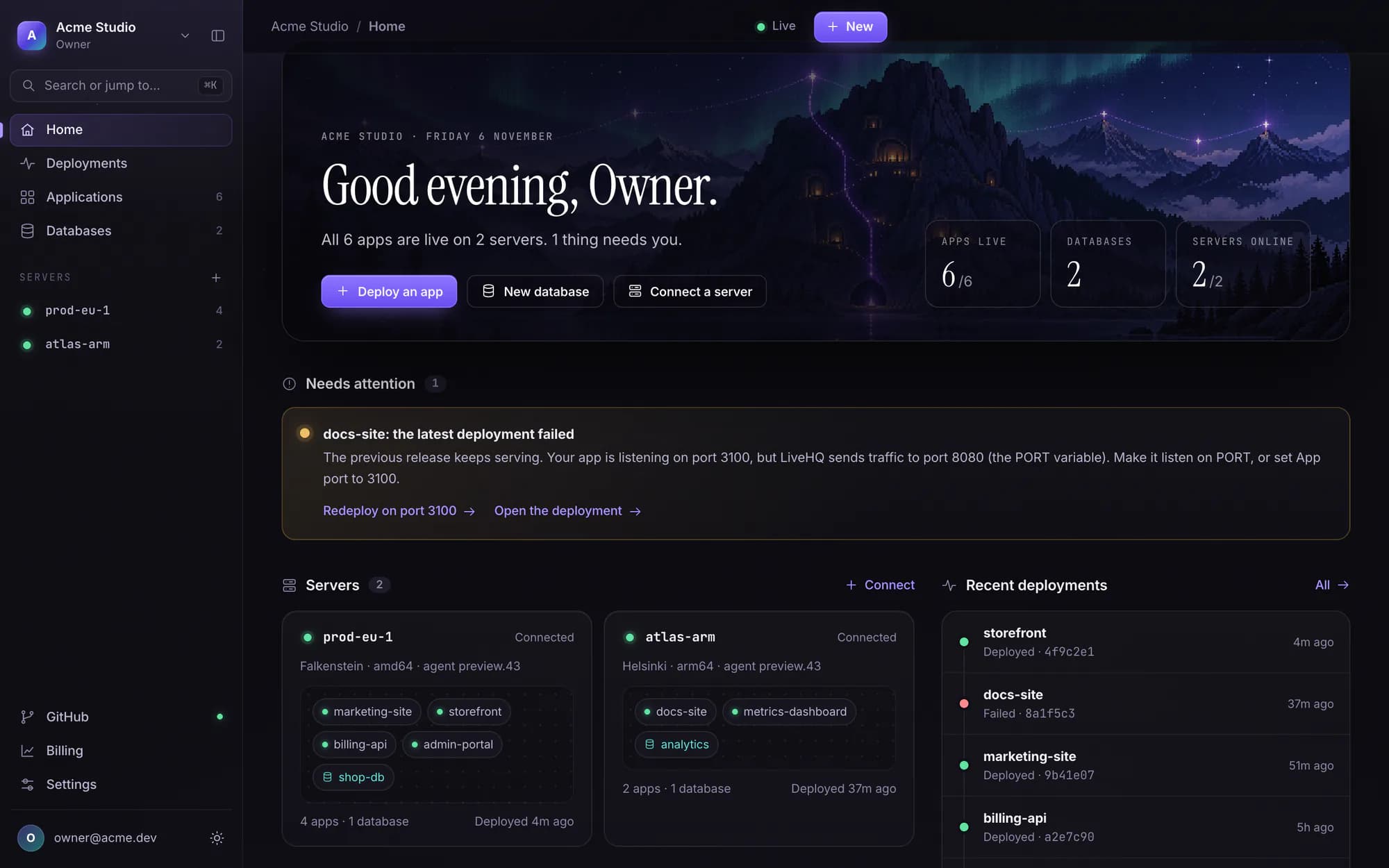
Real screenshots of the LiveHQ console with example data, not mock-ups.

The LiveHQ console's Home page for the workspace Acme Studio: all 6 apps live on 2 servers, 2 databases, and a Needs attention notice saying docs-site's latest deployment failed while the previous release keeps serving, with the fix and a Redeploy on port 3100 link. Below, the two servers with their apps and the recent deployments.

A failed deploy never takes your app down.

The previous release keeps serving, and the notice spells out the fix: here, the port your app should listen on.

Try it here

Don't take our word for it. Try it.

Push. It's live.

Connect a GitHub repository. LiveHQ detects your framework with Railpack or uses your Dockerfile, builds on your own server, checks memory and health, then switches traffic.

  • Deploy on every push, or by hand
  • One-click rollback, no rebuild
  • Failures explained, and emailed to whoever deployed
invoices · deploymentsprod
acme/invoices main8c41f2aAdd invoice PDFs
Deploying
  1. Queued
  2. Build
  3. Start
  4. Health
  5. Live

Example deployment log: LiveHQ clones the repository, builds it with Railpack, checks memory, starts the release on your server, passes a health check and switches traffic, keeping the previous release for rollback.

Memory on vps-fsn11.4 + 0.5 of 3.7 GiB
Roll back to #41Redeploy

The paradigm shift

The same result. A fraction of the work.

One app and one database on your own VPS, private, on HTTPS, behind a global edge, with off-site backups. Counted from each product's own documentation.

Coolify, self-hosted

The documented path to the same setup

Steps
0
Extra accounts
2+
Secrets to handle
4+
  • Connect the serverPassphrase-less root SSH key for the control plane
  • Hide the originCloudflare account, DNS move, tunnel token, routes, firewall rules
  • Get an HTTPS addressYour own domain and records; the generated address is HTTP-only
  • Put up a login wallBasic auth per app, or run Authentik and wire forward-auth
  • Back up off-siteS3 bucket, IAM policy, access keys, schedules, a restore drill

Still setting up…

LiveHQ

The default path

Steps
0
Extra accounts
1
Secrets to handle
1
  1. Create your LiveHQ account
  2. Add a server
  3. Copy the install command
  4. Run it in your own SSH session
  5. Paste the one-time code
  6. Connect GitHub
  7. Pick a repository
  8. Deploy
  9. Add PostgreSQL
  10. Attach it to the app
  11. Schedule encrypted off-site dumps
  12. Point your domain (optional)

Setting up…

Pricing

Free to start. $20 when it's real.

You bring the server, so you never pay LiveHQ for CPU or memory. Plans differ in how much you run, not in how safe it is.

Free

$0 forever

For side projects, and for trying LiveHQ on a server you already have.

Start free
  • 2 servers
  • 3 apps and 3 PostgreSQL databases
  • 10 GB of bandwidth a month
  • HTTPS on a name.livehq.app address
  • Every security feature
  • Not included: Custom domains
  • Not included: Database backups
Most projects

Pro

$20 a month, per workspace

For real projects: more servers, your own domains and backups you can restore.

Start, then upgrade
  • 10 servers
  • 50 apps and 50 PostgreSQL databases
  • 200 GB of bandwidth a month
  • 5 custom domains, then $3 a month each
  • Scheduled and on-demand database backups, encrypted and off-site
  • Everything in Free

Teams

Coming soon

A plan for teams is on the way. It isn't available yet.

On every plan

  • Sealed variables
  • Private apps
  • Managed security updates
  • Server lock and private SSH
  • Passkeys and two-factor sign-in
  • Data savings at the edge
What bandwidth counts
What leaves LiveHQ's edge for your apps: responses to visitors and uploads to your server. Bytes the edge saves with compression and caching don't count (how). Gigabytes are decimal: 10 GB is 10 billion bytes.
At the limit
Owners and admins get an email at 80% and at 100%. At 100%, your apps pause until the next period starts or you upgrade.
Changing plans
Upgrade from the Billing page in your console, paid monthly through Stripe. Moving back to Free takes effect at the end of the period you paid for.

Side by side

Secure by default, not by checklist.

LiveHQCoolify, self-hosted
Runs on a VPS you ownYesYes
Root SSH key held by the platformNo. The agent dials outYes, a passphrase-less key
Web ports published on your serverNone80, 443, 8080; plus 8000, 6001, 6002 when self-hosted
Server IP in your app's DNSNeverYes, unless you set up a Cloudflare Tunnel
Global edge in front of appsIncludedBring and configure your own Cloudflare
HTTPS address on first deployname.livehq.appNeeds your domain; the generated address is HTTP-only
Login wall for private appsBuilt in, on by defaultBasic auth, or run Authentik yourself
Off-site database backupsOn Pro, no storage accountYour own S3 bucket and keys
OS security updatesInstalled nightly, proven in waves, restarts with a kernel safety netOpt-in beta since v4.5; restarts are up to you
Firewall for each appAt the edge, with attack signatures, on every planBring your own WAF, such as Cloudflare's
Close SSH to the internetOne switch; SSH through the tunnelCoolify manages servers over SSH

Fair is fair: Coolify keeps traffic on your own server, runs raw TCP and UDP services and ships a large one-click catalog, and it is open source. LiveHQ serves HTTP, server-sent events and WebSockets, with PostgreSQL today and more services on the way. Read the full comparison

Questions

Straight answers.

Trade-offs included, because you'd find them anyway.

Do I need a Cloudflare or S3 account?

No. LiveHQ runs the edge, issues the certificates and, on Pro, stores your database backups. You bring a VPS and a GitHub repository.

Which servers does LiveHQ support?

Ubuntu or Debian on x86-64 or ARM64, from any provider. The installer sets up Docker if it's missing. Two vCPUs and 4 GB of RAM is a comfortable start.

What can I deploy?

Web apps and APIs that speak HTTP, server-sent events or WebSockets: Next.js, React, Vue and Vite, Python and FastAPI, Rust, static sites, or anything with a Dockerfile, plus PostgreSQL databases. Background workers, cron jobs, persistent volumes and Redis aren't supported yet.

Can LiveHQ get into my server?

No. You run the installer yourself and type a single-use enrollment code from your console, so your LiveHQ password never reaches the server. LiveHQ never holds or adds an SSH key. It can only send typed, exact commands that your server's agent checks, such as deploying a commit or installing waiting security updates, never a shell. Private SSH relays encrypted bytes to your server's own SSH daemon, which only your keys open.

How are my servers kept up to date?

Every day in your server's maintenance window, LiveHQ installs your distribution's security updates and nothing else: no feature updates, no release upgrades. Each new version reaches most servers only after it installed cleanly on others, and is halted for everyone if it causes trouble in two workspaces. LiveHQ can delay an update but never choose one. Docker Engine updates wait for your approval unless you allow bug-fix releases, and you're warned 90 days before your Ubuntu or Debian release loses security support.

Will LiveHQ restart my server?

Only when an update needs it, and only the way you choose. Security updates install in your server's nightly maintenance window. Restarts go in a weekly slot with a day's notice by email, or wait for your approval, and you can pause or turn patching off. A restart keeps the last good kernel as a safety net, and visitors see a “Back in a moment” page meanwhile.

Can I close SSH too?

Yes. Locking a server closes every port on IPv4 and IPv6, SSH included if you choose, starting with a five-minute trial that reopens on its own unless you keep it. An outside check confirms what the internet can see. You can still reach SSH through your server's own tunnel with a one-time command from the console, with your own keys end to end.

What happens when my app is attacked?

Every app has its own firewall at LiveHQ's edge, so whatever it refuses never reaches your server and never counts against your bandwidth. A per-app flood guard is on by default. You can add rules and rate limits, turn on attack signatures and a bot check, or switch on attack mode, which asks every visitor to pass a quick browser check and can turn itself on when traffic spikes. Owners and admins get an email when an app comes under heavy attack. It's all on every plan. The browser check stops scripts and simple bots, not a determined person in a real browser.

What happens when I reach my bandwidth limit?

Owners and admins get an email at 80% and at 100%, and everyone in the workspace sees a banner from 75%. At 100%, your apps pause until the next period starts or you upgrade. Bytes the edge saves through compression and caching never count.

Can LiveHQ read my environment variables?

No. Your browser encrypts each value to your server's own key before it's sent. LiveHQ stores and delivers the encrypted value but holds no key that opens it; only your server can. The flip side: LiveHQ can't show a saved value back to you, so keep your own copy, for example in a password manager.

Could October's platform breaches happen on LiveHQ?

At Railway, the attacker escalated through shared build machines, then decrypted stored secrets with the platform's own credentials. LiveHQ builds on your own server and holds no key that opens your variables, so a stolen LiveHQ database or backup reveals none of them. No platform is immune to every attack; the security page lists what we protect and what we're still building.

Can LiveHQ see my traffic?

Like any edge or CDN, TLS ends at Cloudflare and LiveHQ's edge so requests can be routed and access-checked, then they travel to your server over the agent's tunnel. Your code, builds, containers and databases stay on your server.

What happens if LiveHQ has an outage?

Your apps, builds and data live on your server and keep running there. Visitors reach them through LiveHQ's edge, so while the edge is unreachable they can't load your apps. That's the trade for keeping your server closed to the internet.

Can I leave?

Yes. Your apps are built from your own repository into containers on your server, and your database is standard PostgreSQL. Take your code and your data whenever you want.


And Bramble? Bramble sleeps.

Run your own cloud. Get some sleep.

Sign up, run one command on your server and push. Your first app goes live on its own HTTPS address, private until you share it. Free for two servers and three apps.