0
keys at LiveHQ that can open your app variables

Security · Updated November 2026
LiveHQ is built so the things attackers come for, your secrets and your servers, aren't sitting in our systems to be taken. Here is exactly how, including what we can see and what we're still building.
In October, attackers broke into several developer platforms. At one of them, they pulled customers' encrypted secrets, then used the platform's own internal credentials to decrypt some of them. The encryption didn't help, because the platform held the keys. LiveHQ is built so your secrets never depend on our keys. When you save a variable, your browser encrypts it to a key that belongs to your server, before it leaves the page. LiveHQ stores it and passes it along, but it cannot read it. Not from our database, not from our backups, not by any of our engineers. The only key that opens it lives on your server, and it never leaves. Your server stays closed, too. It opens no web ports, and its address never appears in your DNS. LiveHQ never holds a key to log into it. Your apps run in locked-down containers, your code is built on your own machine, and every agent update is signed with a key that never touches our servers. And we're honest about what comes next: an independent security review, before general availability. LiveHQ. Self-hosting, without the self-defense.
0
keys at LiveHQ that can open your app variables
0
web ports your server opens to the internet
0
SSH keys to your server held by LiveHQ
0
open ports, SSH included, once you lock a server
Most platforms encrypt your environment variables with keys they hold, so they can decrypt them for you, and so can anyone who steals those keys. LiveHQ removes that key from the platform entirely.
When the LiveHQ agent starts, your server creates an encryption key pair. The private half is stored encrypted on your server, readable only by root, and never leaves it.
When you save a variable, the console encrypts it to your server's public key before sending it. Each value is bound to its app, server, name and scope.
LiveHQ stores the sealed value and hands it to your server at deploy time. It refuses plaintext, and nothing in LiveHQ can open what it stores.
Your server decrypts the value, checks it was sealed for exactly this app and name, and passes it to your app privately, never in logs, labels or image layers.
1 Your browser
Sealed here, before it leaves the page.
2 What LiveHQ stores
Nothing yet.
Also all a thief could take.
3 Your server
Waiting for a value.
The only key that opens it never leaves your server.
Real HPKE (RFC 9180) with X25519 and AES-128-GCM, the encryption LiveHQ uses, running entirely in your browser. Nothing you type is sent anywhere.
hpke crate. Both reproduce RFC 9180's published test vectors, and a value sealed by the console is opened by the agent in our test suite.The Security tab
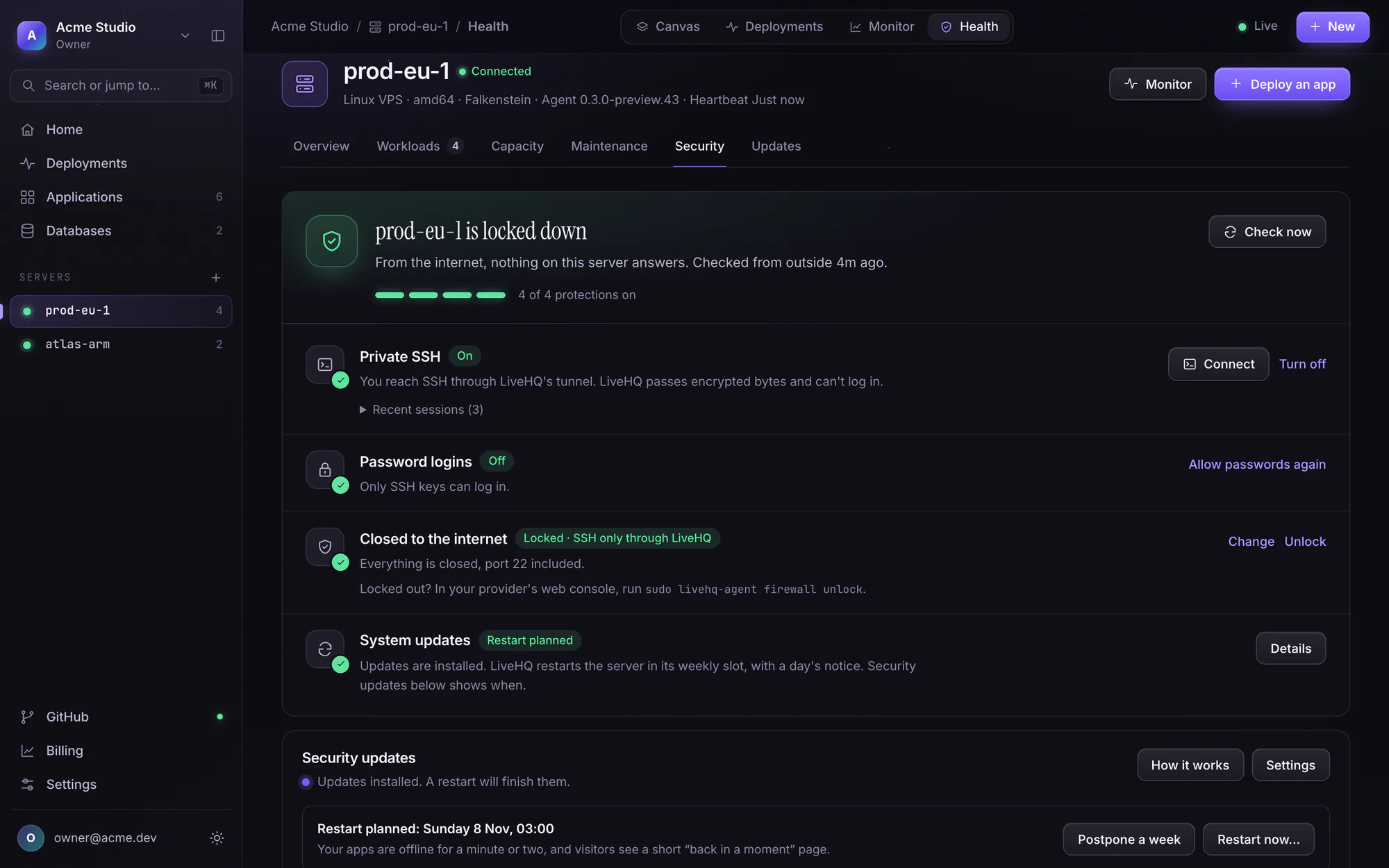
Every server you connect gets a Security tab. It shows what the internet can see, closes what shouldn't be open and keeps SSH for you alone, each with one switch and a way back.
Exposure check · The lock
Your server lists everything listening beyond itself, and which program owns it. LiveHQ then checks from outside, the way an attacker would: those ports and about 60 common ones, every week and whenever you press Check now.
Private SSH · Keys only
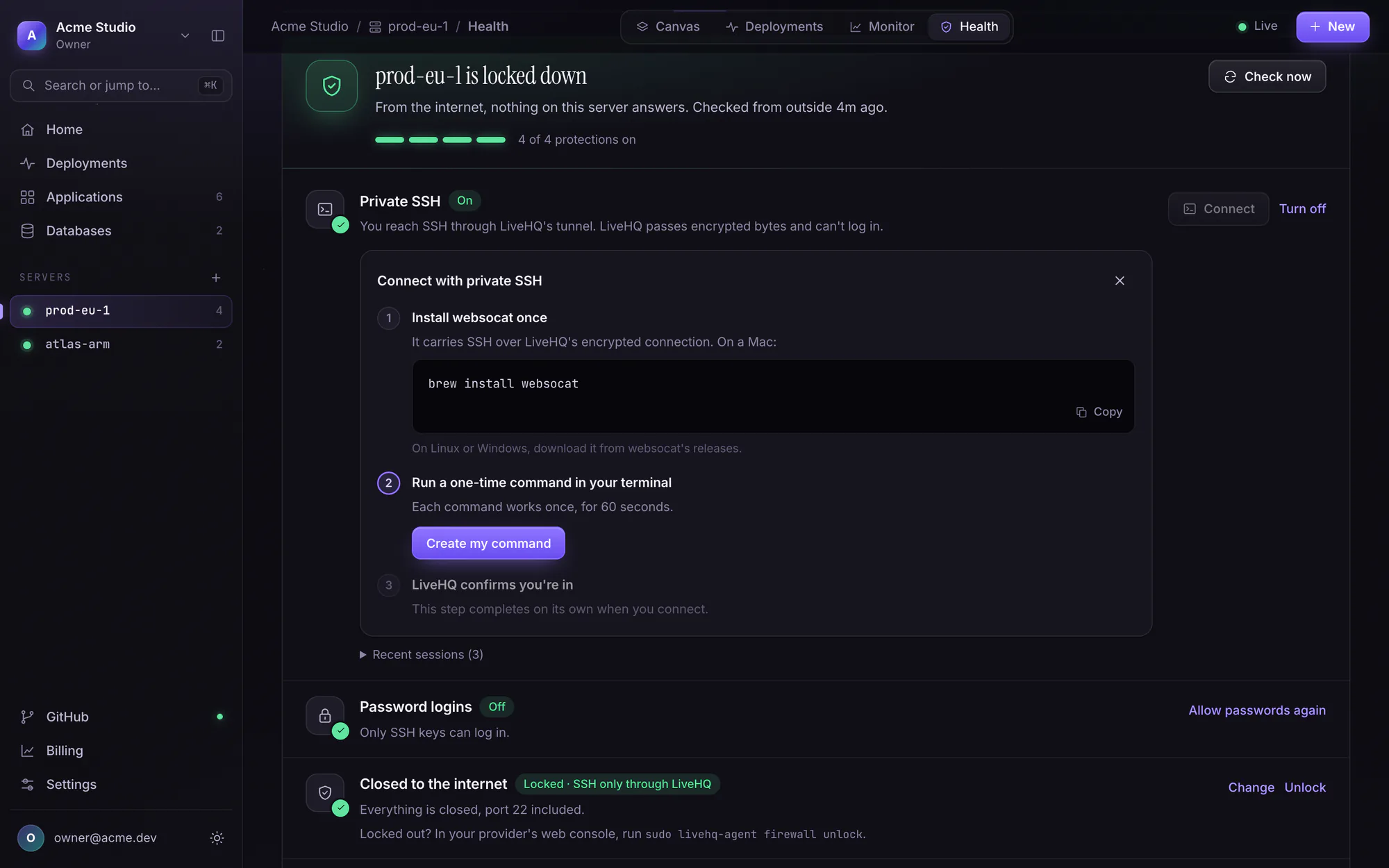
With port 22 closed, SSH still works. Ask the console for a one-time command: it reaches your server's SSH daemon through the tunnel your server already opened, so LiveHQ relays encrypted bytes and the login stays between your key and your server.
Your server reports hourly and right after every action: its release and when security support ends, waiting updates, a needed restart, the running kernel and how SSH lets people in. Problems read like “SSH accepts password logins. Keys only is safer.”
Every Monday, one email per workspace: what each server installed, the CVE numbers it closed, restarts, what's waiting, and what the outside check found. Owners and admins can email it to themselves any time.
With two-factor sign-in on, locking, unlocking, SSH, keys only, restarts, patching settings and database credentials all ask for a passkey or code from the last 15 minutes.
Managed patching
A security fix only protects a server once it's installed. LiveHQ installs your distribution's security updates every day in your server's maintenance window, 03:00 by default. It proves each one on other servers first and plans the restarts, so you never have to log in to stay current.
Your server checks in at the start of its window. If a deploy, build, backup or restore is running, or disk is short, the run waits.
It looks only at what its distribution's security channel has waiting: never feature updates, release upgrades or repositories you added yourself.
A new version reaches about one server in ten first, and everyone a day later, once it installed cleanly in other workspaces. Trouble in two workspaces halts it for everyone.
Packages signed by your distribution install through APT, each pinned to its version, your configuration kept. Then Docker, every app that was healthy, the tunnel and SSH must all check out.
When the kernel or a core library needs a restart, it is booked into your weekly slot at least a day away and you're emailed. Or it waits for your OK.
The server boots its new kernel once. If that kernel can't start, the machine restarts into the previous one by itself, never tries it again, and reports it toward the fleet-wide halt.
While the server restarts, visitors see a short maintenance page instead of an error, and private apps stay private.
The Security tab lists every run with its packages and the CVE numbers they close, and Monday's weekly report sums up each server's week.
An example week with the default times, in your server's maintenance time zone. The kernel safety net works wherever GRUB is the boot loader; servers whose provider supplies the kernel restart normally.
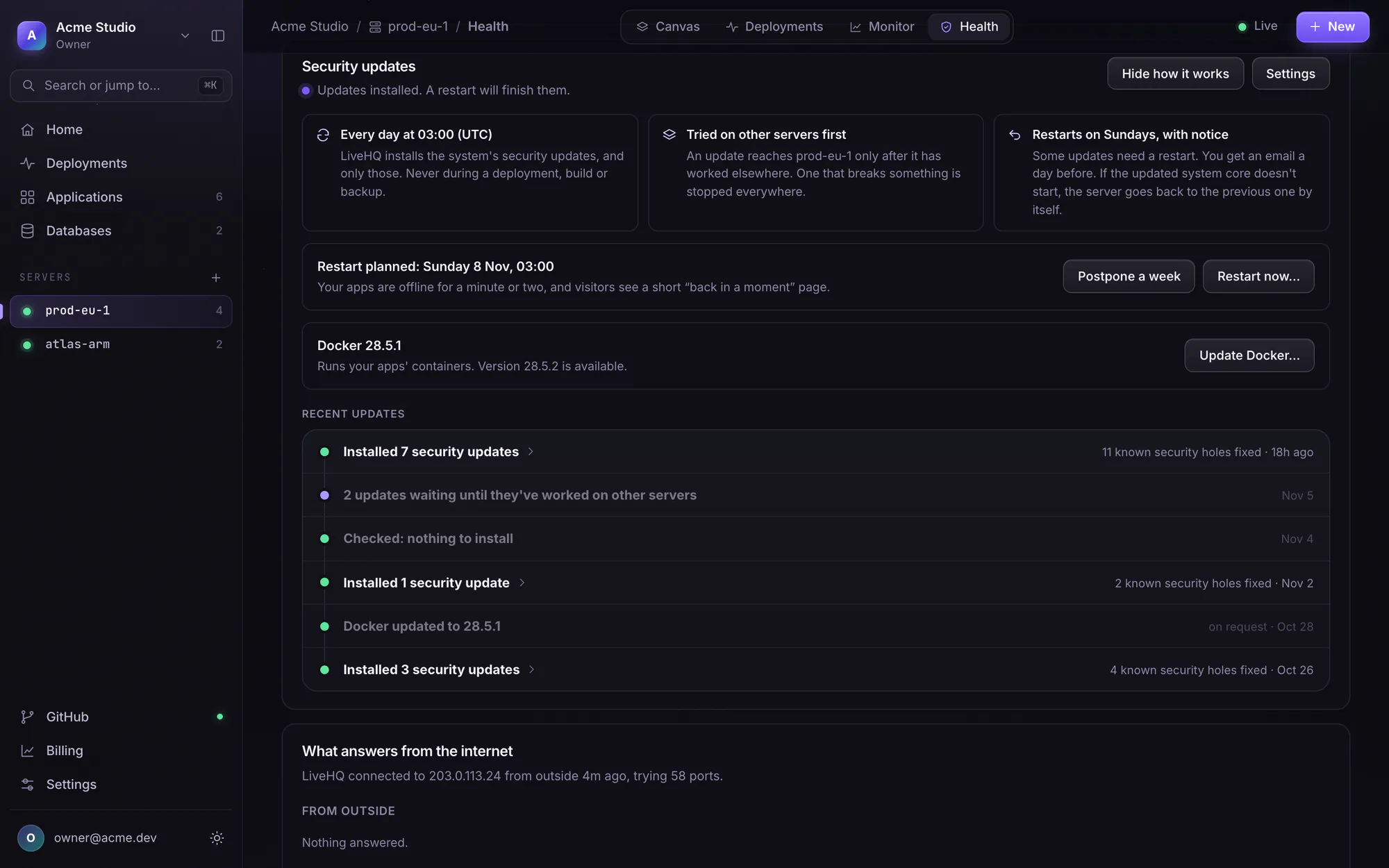
Changing these settings asks for a second factor when two-factor sign-in is on.

App firewall
It runs at LiveHQ's edge, so whatever it refuses never reaches your server. And blocked traffic is never counted against your plan's bandwidth.
See the firewallSQL injection, cross-site scripting, path traversal, command injection, Log4Shell and more, in the spirit of the OWASP Core Rule Set. Try them log-only first.
Scripts, headless browsers and fake search-engine bots get a browser check or a refusal. Verified crawlers and webhooks are never challenged.
One switch makes every visitor pass a quick browser check. It can also turn itself on for 15 minutes when traffic jumps far above normal.
Plans only size the lists. Every protection is on Free too, and one app's attack never changes another app's limits.
Trust should be precise. Here is the whole list.
LiveHQ cannot
LiveHQ can
Most of these are how every LiveHQ server and app starts. The lock, private SSH, passkeys and the firewall's stricter protections are one switch away, on every plan.
Apps listen on your server's loopback. Traffic arrives through the agent's outbound tunnel, so there is nothing to scan.
Your domains point at the edge. Scanners and attackers find Cloudflare and LiveHQ, never your machine.
You install the agent yourself. LiveHQ never holds a key to your server and never sends it a shell script.
Requests through the tunnel are signed by LiveHQ's edge, and your server checks every signature.
Your code is built on your own server, never on build machines shared with other customers.
Apps run with every Linux capability dropped, no privilege escalation, a seccomp filter, memory, CPU and process limits, and networks that can't reach your host or LAN.
New apps need sign-in. The edge checks who is asking before a request ever reaches your server.
Every agent release is signed with a key kept offline, away from LiveHQ's servers. Your server verifies it before installing.
The console loads scripts only from itself and connects only to itself, which shuts out injected code.
Your server installs its distribution's security updates nightly, in waves that halt on their own. Restarts come with notice or your approval, and a kernel safety net.
One switch closes every port on IPv4 and IPv6, SSH included if you choose, after a five-minute trial. An outside check shows what the internet can see.
Reach SSH through your server's own tunnel with a one-time command, your keys end to end. Keys-only SSH is one switch.
Each app's own rules, rate limits, attack signatures, bot check and attack mode, enforced at the edge before a request reaches your server. On every plan.
Apps reach databases on their server over per-pair internal links, so a database needs no public port.
Sign in with a passkey or an authenticator. With two-factor on, locking, SSH and database URLs ask for a second factor from the last 15 minutes.
Servers enroll with a single-use code from the console, so your LiveHQ password is never typed on a machine.
On October 21, 2026, Railway disclosed that an attacker had escalated privileges in its build infrastructure, pulled customers' encrypted environment variables, and decrypted a subset with compromised internal credentials. Railway estimated that up to about 1.85% of workspaces were affected. Wiz counted at least nine developer platforms with incidents that month, many hunting stored API keys.
The lesson isn't about one company. Any platform that can decrypt its customers' secrets can be made to. So we built LiveHQ so that it can't.
LiveHQ vs RailwayEmail [email protected] with the details and how to reproduce it. We reply to every report, fix confirmed issues first, and credit you if you wish. Please give us a reasonable chance to fix an issue before disclosing it, and never access other people's data while testing. Our contact details are also in security.txt.